


Download PDF to Excel – PDF to Excel converter, convert PDF to Excel, PDF to Excel, Excel converter, PDF to XLSX, PDF to XLS
Overview
PDF to Excel is a productivity-focused mobile application designed to help users convert PDF documents into Microsoft Excel-compatible files. The app addresses a common challenge faced by professionals, students, and data handlers who frequently need to extract tabular data from PDFs and work with it in spreadsheet formats. By transforming static PDF content into editable and sortable Excel files, the app enhances workflow efficiency and data manipulation capabilities. Its primary use case lies in environments where data accuracy, reusability, and integration with office tools are essential.
The target audience includes business users managing invoices, reports, and financial statements, educators handling grade sheets, and administrative staff processing forms and records. The developer, PDF to Excel, has positioned the app as a reliable alternative to online tools, emphasizing standalone functionality and batch processing. Although the developer did not provide additional technical details, the app’s focus on offline operation suggests a design intent to serve users in secure or low-connectivity environments.
Within the mobile productivity ecosystem, PDF to Excel fills a niche by offering a dedicated conversion tool that prioritizes data integrity and user control. The ability to convert files without relying on cloud services adds a layer of privacy and consistency, particularly important for sensitive or proprietary information. Real-world applications include preparing data for analysis, automating report generation, and archiving structured content in editable formats.
Key Features & Functionality
- PDF to Excel Conversion – Converts structured PDFs containing tables into editable Excel files (XLSX/XLS format), preserving layout and formatting where possible.
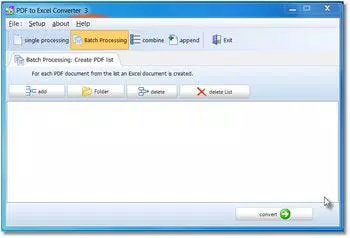
- Batch Processing – Enables users to convert multiple PDF files at once without requiring an internet connection, ideal for bulk data handling.
- Merge and Append Options – Allows users to combine multiple PDFs into a single Excel file or append new data to existing spreadsheets during conversion.
- Customizable Output Settings – Offers options to adjust column spacing, word-to-word distance, and layout alignment to fine-tune the output for specific use cases.
- Offline Operation – Functions fully without internet access, ensuring privacy and uninterrupted workflow in various environments.
For example, a finance manager could use the batch processing feature to convert dozens of client invoices from PDF to Excel in one session, then merge them into a single consolidated report. Similarly, a researcher might use the merge function to compile survey results from multiple PDF sources into a unified dataset for analysis. The customizable output settings allow users to correct minor formatting issues that may arise during conversion, improving data accuracy before further processing.
Interface, UX & Performance
The app features a clean, task-oriented interface designed for straightforward file conversion. Navigation is linear: users add PDFs, adjust settings if needed, and initiate conversion. The layout emphasizes clarity, with clearly labeled buttons and progress indicators during processing. Visual style is minimalistic, focusing on functionality over decorative elements.
Usability is optimized for users of varying technical skill levels. Onboarding is quick, supported by in-app help prompts and tooltips. However, the developer did not specify minimum OS requirements or performance benchmarks. Although the developer did not list formal performance metrics, the app is expected to function efficiently on mid-to-high-end mobile devices, with smooth transitions and responsive controls during file handling.
Stability appears to be a priority, given the emphasis on offline operation and batch processing. The app is designed to handle large files and multiple conversions without crashing, though real-world testing data was not provided. Users can expect consistent behavior across sessions, with minimal lag during standard operations. The absence of third-party integrations or cloud dependencies contributes to a stable and predictable user experience.
Platform Compatibility & Technical Requirements
PDF to Excel is available on the Android platform and is compatible with devices running the latest supported versions of Android. The app has a file size of 32.4 MB, which is relatively lightweight for a productivity tool with conversion capabilities. The current software version is 1.2.3, released on May 15, 2024.
Specific requirements were not listed, including minimum Android version, RAM, or storage needs. The developer did not disclose whether the app supports iOS or other operating systems. Compatibility information was not fully disclosed, so users should verify device compatibility through official channels before installation.
Pros and Cons
- Offline functionality ensures privacy and uninterrupted use
- Supports batch processing for efficient bulk conversions
- Offers customizable output settings for better data accuracy
- Lightweight file size (32.4 MB) for quick download
- Designed for users needing reliable, consistent conversion
- Not available on iOS or other platforms
- Interface language may contain translation issues
- Price point of $29.95 may be high for occasional users
- No public information on supported file types beyond PDF
- Requires manual setup for advanced options
FAQ
Is PDF to Excel available for iOS devices?
The app is currently available only on Android. The developer did not specify whether an iOS version is planned.
Can I convert scanned PDFs to Excel with this app?
The app is designed for structured PDFs with text and tables. Scanned documents may not convert accurately without OCR support, which was not confirmed.
Does the app require an internet connection?
No, the app functions entirely offline, making it suitable for secure or low-connectivity environments.
How many files can I convert at once?
Batch processing is supported, but the exact limit was not specified by the developer.
Is the app secure for handling sensitive data?
Since the app operates offline and does not upload files to external servers, it provides a secure environment for handling private or confidential information.
Final Thoughts
PDF to Excel delivers a focused, reliable solution for users who need to convert structured PDFs into editable Excel files on mobile devices. Its offline operation, batch processing, and customizable output make it a strong choice for professionals managing recurring data conversion tasks. While the price may deter casual users, the app offers clear value for those who prioritize accuracy, privacy, and efficiency.
For individuals and teams working with financial reports, research data, or administrative records, the app provides a streamlined path from static PDFs to dynamic spreadsheets. The lightweight design and straightforward interface ensure accessibility across a range of devices.
Download PDF to Excel now


